
Overview
A pen that turns a neurologist's Parkinson's exam into data a patient can collect on their own.
Stylus is a pen-shaped medical device that pairs with an iPad to measure the four cardinal motor symptoms of Parkinson's disease in under 30 minutes, with no specialist in the room. Ceraxis later brought it to market as the Ceraxis Insight Motiv stylus. I wrote the firmware that runs on the pen and the Swift iPad app it talks to, built the calibration process and tools, and tested the device from the first prototype board through the production run.
What is inside the pen
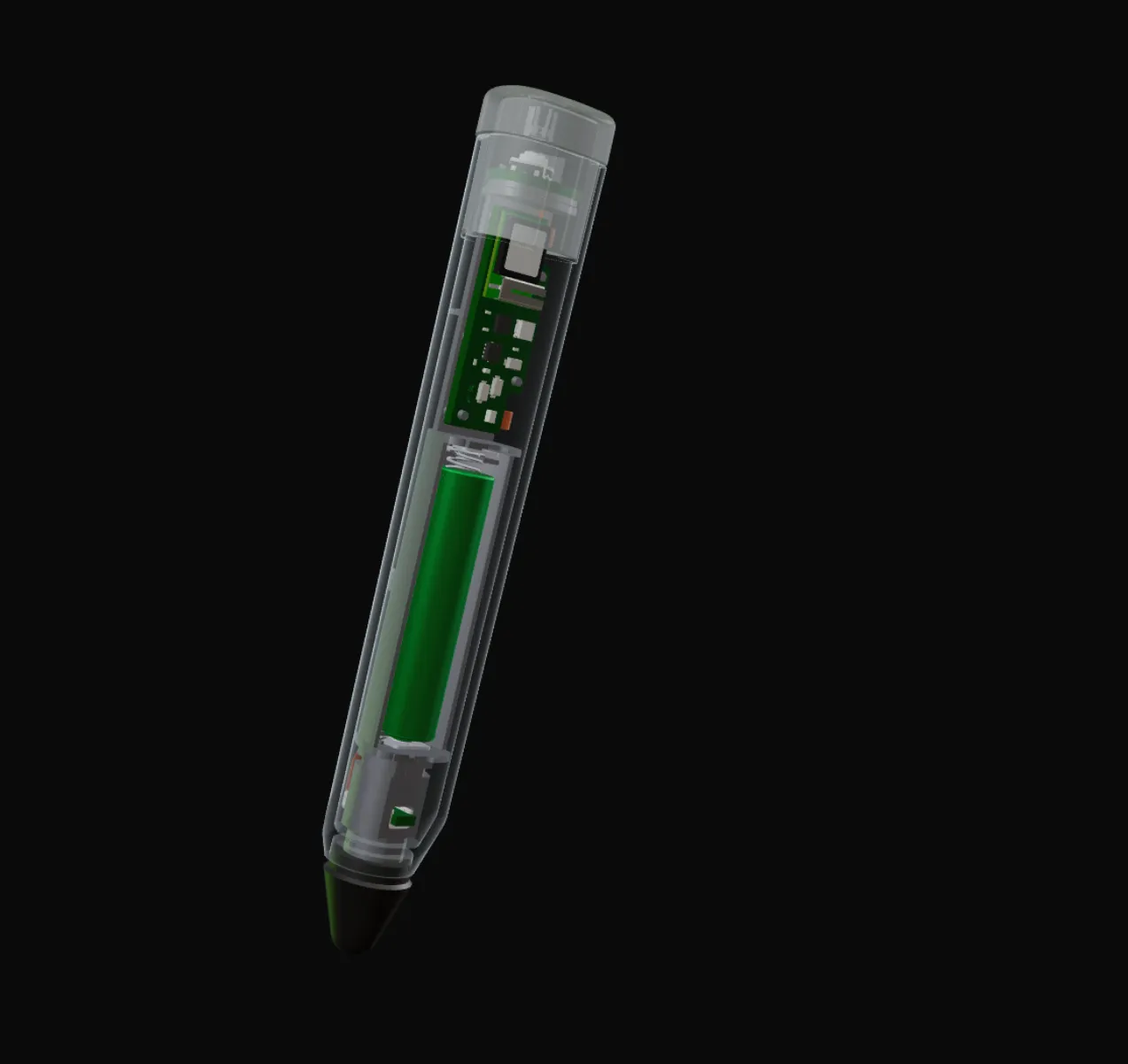
The sleeve is drawn as glass. The main board, mid-barrel, carries the accelerometer, gyroscope, magnetometer and the nRF52 that samples them. Below it is the battery; behind the tip is the force sensor; under the clear cap are the button and status LEDs.
Hover or tap a ring, or pick a part from the list, to read what it does. Ring positions are approximate.
IMU and magnetometer
Accelerometer, gyroscope and magnetometer on the main board, sampled by the nRF52.
Drag to turn · hover a ringDrag to turn · tap a ring
The problem
The standard Parkinson's exam needs a specialist in the room, and most patients never see one.
- of people with Parkinson's see a movement-disorder specialist in a given year
- <10%
- see no neurologist at all
- ~1 in 2
- the scale each item of the standard exam (MDS-UPDRS III) is scored on, by eye
- 0–4
Source: Miller Koop et al., Sensors 2026
Movement disorders are mostly assessed by eye. A neurologist watches a patient tap their fingers, hold out their arms or walk across the room, and scores what they see against a scale. The standard version, the MDS-UPDRS Part III, is scored 0 to 4 per item, varies from clinician to clinician, and cannot tell whether a tremor is a little better than it was three months ago. It also needs the clinician to physically move the patient's limbs, so it cannot be done remotely, and fewer than one in ten people with Parkinson's see a movement-disorder specialist in a given year.
The idea behind Stylus was to put the measurement where the movement is. If the pen itself knows its orientation, its angular rate and how hard it is being pressed, every task becomes a dataset: a tremor can be measured in hertz and degrees per second instead of adjectives.
The brief
Measure all four cardinal symptoms, self-administered, in under 30 minutes.
- All four symptoms. Slowness of movement (bradykinesia), rigidity, tremor, and balance and gait, not just the tremor most devices chase.
- Self-administered. No clinician moving the patient's limbs; the app has to teach each task on its own.
- Under 30 minutes for the full exam, so it fits in a clinic visit.
- All of it in a pen. Battery, sensors, radio and storage inside a hand-held enclosure with no external port.
Every decision further down traces back to one of these.
The landscape
Most Parkinson's technology measures one symptom. This had to measure four.
Paper spiralPen and paper
- Cardinal symptoms
- Tremor only, scored by eye
- Objective numbers
- No
- Self-administered
- No: a clinician scores it
- Clinic time
- Minutes, plus a specialist
Wrist wearableSingle-sensor device
- Cardinal symptoms
- Usually one, e.g. tremor
- Objective numbers
- Yes
- Self-administered
- Partly: worn, not an exam
- Clinic time
- Continuous wear
StylusPen and iPad
- Cardinal symptoms
- All four
- Objective numbers
- Yes
- Self-administered
- Yes
- Clinic time
- Under 30 min
Of nearly 600 Parkinson's technologies reviewed, 6% reached clinical-use evidence.
A systematic review of nearly 600 Parkinson's technologies found that only 6% had evidence strong enough to justify clinical use, and most single-sensor devices, such as a wrist-worn accelerometer for tremor, capture one symptom and miss the other three. Paper spiral tests are cheap, but they are still scored by eye.
A pen was the right shape for the job. It is already the object in the patient's hand for tapping, tracing and holding still, and the iPad screen underneath gives every task a precise target to measure against. That positions the product where specialists are scarce: clinics without a movement-disorder neurologist, deep-brain-stimulation programs checking a patient's stimulator settings, and studies that need to track how a medication is working on a schedule.
The device
Force sensor, motion sensors, radio and backup storage, all inside a pen.
Sensing
- Motion
- 3-axis accelerometer and gyroscope; a 3-axis magnetometer joined in a later board revision
- Force
- Force sensor in the tip assembly
- Docking
- Hall-effect sensor detects the wireless charging dock
- Sample rate
- 100 Hz motion sensors, 30 Hz force
Interface
- Controls
- One cap button, multicolour LEDs under a clear cap
- Storage
- On-board backup storage for recordings
Radio
- Link
- Bluetooth Low Energy to an iPad app
Compute
- Processor
- Nordic nRF52
- Firmware
- C on Zephyr RTOS (nRF Connect), ported from the nRF SDK
Along the pen axis, from the tip: the rubber tip and the force sensor it presses on, the battery, the main board carrying the inertial sensors, the nRF52 and its radio, the chassis that holds it all in the sleeve, and the cap with its button and status LEDs. A magnetometer joined the accelerometer and gyroscope in a later board revision.
 12345678
- 1 Rubber tip
- 2 Force sensor plunger
- 3 Tip housing
- 4 Battery
- 5 Main board: IMU, magnetometer, nRF52
- 6 Chassis
- 7 Cap button and LEDs
- 8 Clear cap
The parts in assembly order. Positions are approximate; the render is from my Blender model of the device.
The app walks the patient through nine modules: tapping the pen between their chin and a target on the screen, holding it out at arm's length, resting their hands in their lap, rotating their wrist, tracing a spiral, holding a steady pressure on a dot, tapping with two fingers, standing still with eyes open and then closed, and walking three metres, turning and sitting back down. Each is adapted from an item a neurologist would score by eye, and each runs for 20 seconds per hand after a five-second practice trial.
Under every task, the pen does the same thing: four sensors, one clock. The accelerometer gives gravity and linear acceleration, which is how the pen knows which way is down and how sharply it was moved. The gyroscope gives angular rate, which is what a tremor actually is: a small oscillation in degrees per second, several times a second. The force sensor adds how hard the tip is being pressed. The firmware reads the motion sensors at 100 Hz and the force sensor at 30 Hz, stamps every frame with the same time base, and never lets one channel fall behind another.
Force sensor
0% of full scale
The tip rides on a force sensor, so every drawing task carries a pressure channel alongside position: how hard the pen is pressed, how steady that pressure is, and how it changes through a stroke. The firmware samples it with the motion data so the two stay in lockstep.
The emergent-tremor task asks the patient to hold a steady pressure on a target. Wobble in the force trace is the measurement.
Firmware built for a parts list that kept changing
When the chip shortage wiped out the parts list, I rebuilt the firmware so the next part swap would be a configuration change.
The first firmware was written on Nordic's nRF SDK with the components tightly coupled: one change rippled through a dozen files. When the 2020 chip shortage took most of the production bill of materials out of stock, the board had to be redesigned around parts we could actually get, and the launch date did not move.
I ported the whole firmware to Zephyr RTOS in about two months, and treated the port as a chance to fix the architecture rather than just move it. Each component got a public interface and hid its implementation. Zephyr's devicetree describes each board revision in configuration rather than code, so the same application runs on PCBs with different parts fitted. Drivers sit beneath a sampling thread that owns the clock; calibration, storage and the Bluetooth service consume its frames. The next part swap, including the magnetometer added in a later revision, was a devicetree change rather than a rewrite.
Never lose a test
A 30-minute exam is too much to repeat because of a dropped radio link, so the pen keeps every sample.
The pen is the sensor; the iPad is the screen. Over Bluetooth Low Energy the pen advertises, the app connects and starts a task, and the firmware streams sample frames as GATT notifications. Bluetooth drops happen, so every frame is also written to on-board storage; if the link goes down mid-task, the recording survives and is sent once the connection returns.
Pen to iPad · Bluetooth LE
Numbered sample frames stream back as GATT notifications.
Calibration
A patient's results are only useful if they can be compared: this visit against the last one, this pen against another. That depends on calibration, so I wrote the calibration process and the tool that runs it.
Why Calibration Is Critical for Good Data
- Heading accuracy — A 50 mG (≈5 µT) hard-iron offset can introduce more than 10° of heading error at mid-latitudes.
- Sensor fusion — IMU filters (Madgwick, Mahony, EKF, etc.) assume a constant magnetic-field magnitude; uncalibrated bias corrupts not only yaw but also roll and pitch estimates.
- Repeatability & traceability — For overlaying data on maps, comparing devices, or detecting anomalies you need readings in absolute Earth-field units.
- Drift compensation — Bias varies with temperature and supply voltage; regular calibration (or live monitoring) keeps measurements trustworthy.
The three coloured clouds you see at first are raw magnetometer readings. Each cloud sits inside its own sphere because the sensor is still carrying hard-iron offsets and soft-iron distortion—so every orientation of the device reports a slightly different “magnetic field length” and a different centre point.
Click the Calibrate button to run the calibration routine. Watch as the three clouds collapse into one perfectly centred sphere: that’s the sensor after both the offsets and the scale/skew errors have been removed. Once all the points share the same origin and radius, the magnetometer can deliver accurate, repeatable heading data to the rest of the system.
The particle demo above is an illustration. These are the real plots from the calibration tool I wrote: raw magnetometer samples from a pen rotated through every orientation, then the same samples after the hard-iron offset and soft-iron matrix are applied.


The iPad app
I built the other half too: the Swift app patients actually use.
Trace the spiral from the centre outward
Keep the tip on the glass. Start when the tone sounds.
Try it once. The real task follows.
Session complete
Uploading for your clinician to review
Mock-ups of the four states every task passes through. Swipe on a phone.
The pen is the sensor; the app is the exam. Written in Swift, it connects to the pen, teaches each task with a demonstration and spoken instructions, runs the practice trial before every timed one, records the screen's own touch and target data alongside the pen's stream, and uploads the finished session for a clinician to review. Self-administered only works if the patient never has to ask what to do next, so most of the design effort went into making each step obvious.
Outcomes
In a clinical study, the pen's measurements tracked a blinded neurologist's scores.
- 0.87concordance
- Agreement with a blinded neurologist's ratings, bradykinesia
- 0.91AUC
- Telling deep-brain stimulation on from off
- 84.8SUS
- System Usability Scale score; an A grade starts at 78.8
- <30min
- Full exam, self-administered
Miller Koop et al., Sensors 2026 · 19 participants, single site
In a study of 19 people with Parkinson's at Cleveland Clinic, published in Sensors in 2026, a movement-disorder neurologist scored each participant with the standard exam without seeing the sensor data. Measures from the platform agreed closely with those scores, with a concordance of 0.87 for bradykinesia, and told deep-brain stimulation on from off with an area under the curve of up to 0.91. Participants rated it 84.8 on the System Usability Scale, well above the 78.8 threshold for an A grade, and the full exam took under 30 minutes.
What's next
At-home use is where the design choices above pay off most: a self-administered exam, a pen that never loses a recording, and calibration that makes one visit comparable to the next.


